An AWS Account With No Keys and No Docs — How $1,650/mo Became $400
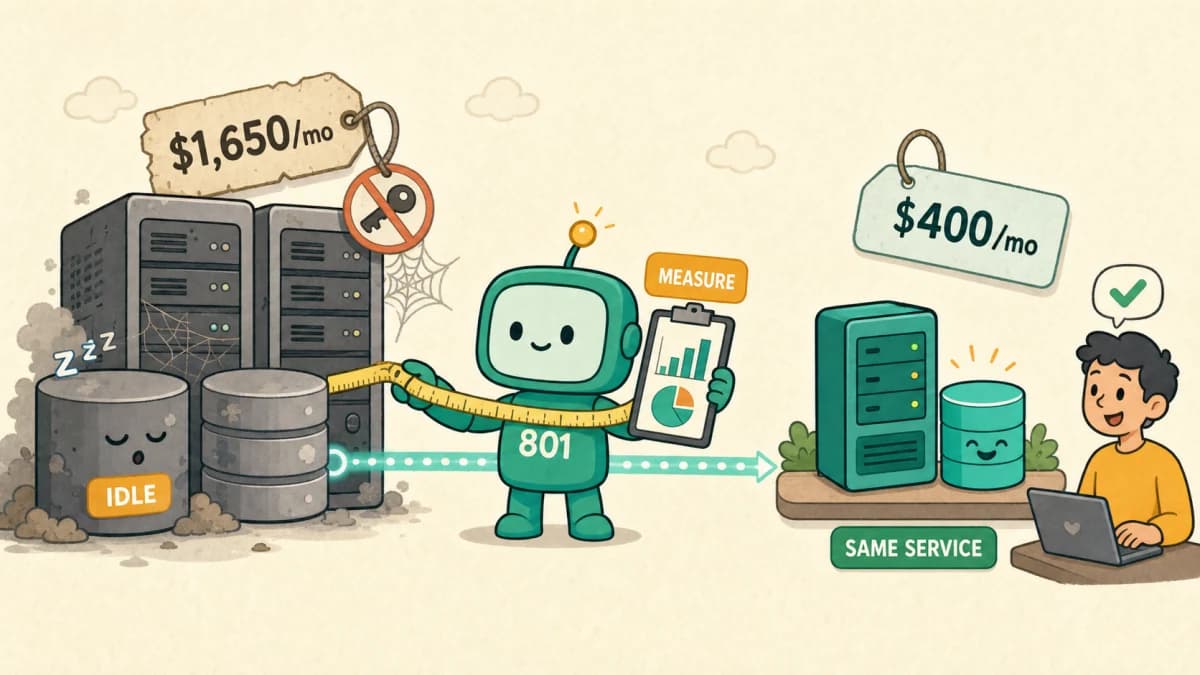
The starting state looked like this. The PEM keys were lost, and there was no infrastructure documentation. The account was a member account under a billing reseller's payer account, so Cost Explorer was disabled. We could not log into the servers and could not see a cost graph, yet the invoice arrived every month. It is a familiar combination in accounts where the handover chain broke somewhere along the way.
Fortunately the SSM agent was alive on every instance. Session Manager gave us a shell without any keys, and that channel became the foundation for every verification step that followed.
We took inventory through APIs, not the invoice
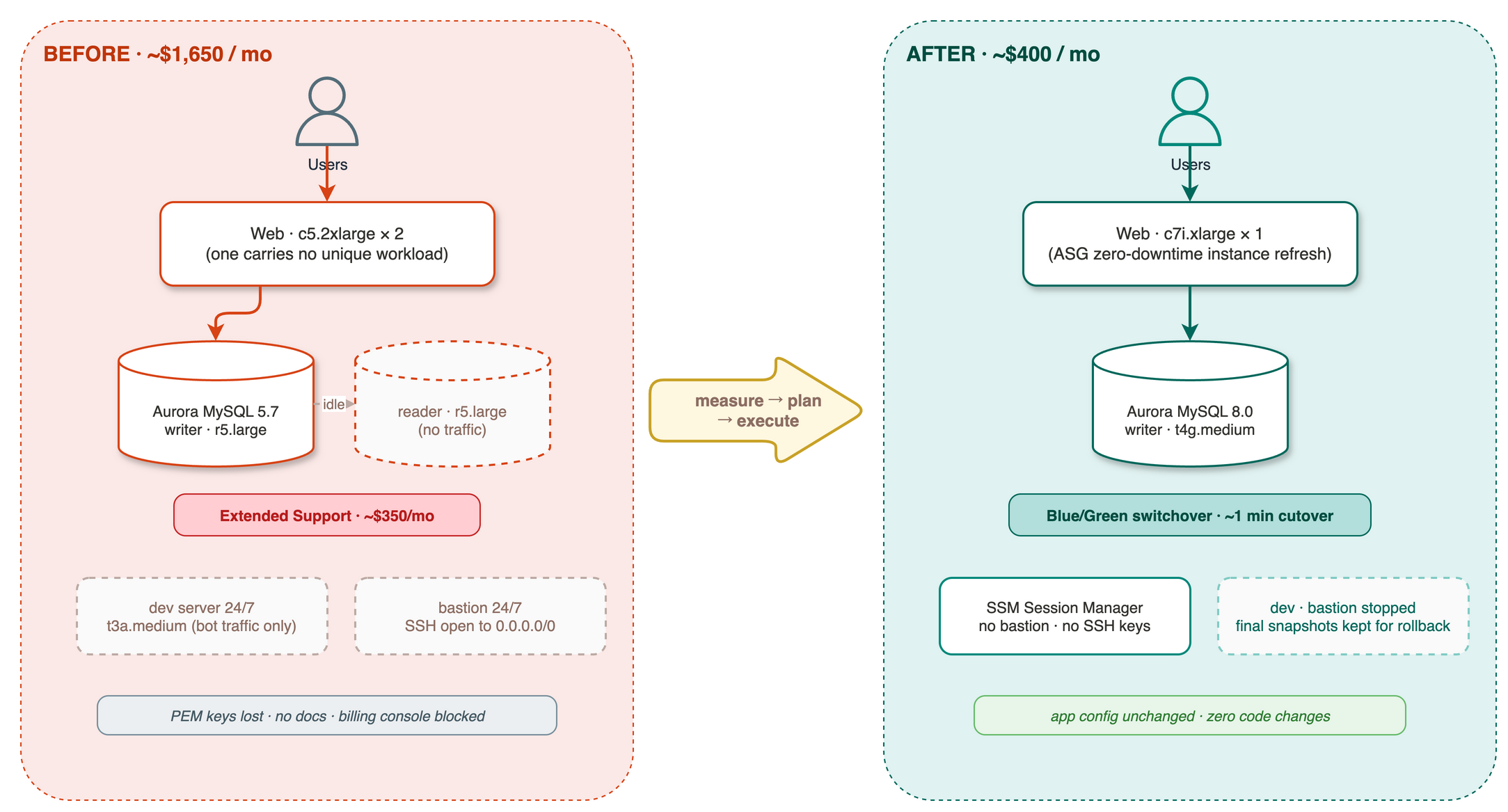
With the billing console blocked, we built the inventory from individual service APIs: every EC2 instance, RDS cluster, EBS volume, snapshot, EIP, and load balancer, each annotated with Seoul-region on-demand pricing. The picture that emerged:
- Two c5.2xlarge web servers, oversized for the traffic. After verifying cron jobs and batch processes, one carried no unique workload at all.
- An Aurora MySQL 5.7 cluster with an r5.large writer and an r5.large reader. The application config pointed only at the cluster (writer) endpoint, so no traffic ever reached the reader. An instance doing nothing but waiting was costing $255 a month.
- MySQL 5.7 is past standard support, so RDS Extended Support was quietly billing around $350 a month.1
- A dev server and a bastion ran around the clock. Two weeks of the dev server's access logs showed no real usage, only bots and scanners.
Sizing decisions came from measurements, not guesses. Over the last seven days, database CPU peaked at 17–24% with at most 4–5 concurrent connections. Total data across all schemas was about 700MB. The working set that an r5.large with 16GB of memory was carrying fits entirely inside the buffer pool of a 4GB instance.
The plan: biggest items first, everything reversible
Sorting the savings candidates by amount put the top three all in the database: removing the reader, escaping Extended Support, and downsizing the writer add up to $793 a month, two-thirds of the total. We set three execution principles.
- Create a recovery point before anything destructive. An AMI before terminating an instance, a snapshot before touching the cluster.
- Prefer the platform's zero-downtime tooling. ASG instance refresh for EC2 replacement, Blue/Green deployments for the DB major upgrade.2
- Delete last. Stop resources first, hold an observation window, then delete with a final snapshot retained.
Execution 1 — EC2: termination comes after verification
Between "this server looks unused" and "this server is unused" sits verification. We swept crontabs, systemd timers, and process lists on both web servers over SSM to confirm no hidden batch jobs, and only then terminated one, with an AMI backup taken first. The remaining server was swapped from c5.2xlarge to c7i.xlarge through an ASG instance refresh with zero downtime.3 Two instance generations newer, and with more headroom than before.
The dev server and bastion were stopped, not deleted. Once SSM-based access settles in, a bastion has no reason to exist, so it went on the retirement list.
Execution 2 — Aurora: the three biggest pieces
Removing the reader was trivial. The hard part was the major upgrade from 5.7 to 8.0. The plan was a Blue/Green deployment: stand up an 8.0 environment (green) alongside production, let replication sync, then switch over. The first attempt failed at the pre-check.
{"level": "Error", "dbObject": "all",
 "description": "Your Master User on host '%' has been dropped.
 To proceed with the upgrade, recreate the master user `admin` on default host '%'"}
At some point in the past, someone had created an application-specific account and dropped the master user. Running 5.7 day to day, this showed no symptoms. Then a major upgrade arrived, and a six-year-old decision suddenly showed up holding an invoice. RDS recreates the master user when you reset the master password, so the fix was a single API call.4 The recreated credentials went into Secrets Manager.
The second attempt brought the green environment up cleanly. Before switching, we connected to green directly and checked that the version, timezone, and row counts of key tables matched production. Seeing the member table report the same 140-thousand rows on both sides, we ran the switchover. AWS swaps the endpoint names, so zero application config changes were needed, and the cutover blip lasted about a minute.
Finally we moved the writer from r5.large down to t4g.medium. During that transition's brief downtime, the web ASG detected failing health checks and replaced its instance, which is not an incident but self-healing working as designed. We confirmed the ALB target returned to healthy after the transition. The old 5.7 cluster was deleted with a final snapshot retained, ending the Extended Support charges.
Retrospective: what produced how much
| Item | Action | Monthly savings (Seoul on-demand, est.) |
|---|---|---|
| Terminated one web server | c5.2xlarge, after AMI backup | ~$280 |
| Web server generation swap | c5.2xlarge → c7i.xlarge | ~$133 |
| Removed the Aurora reader | r5.large with no traffic | ~$255 |
| Ended Extended Support | 5.7 → 8.0 upgrade | ~$350 |
| Downsized the Aurora writer | r5.large → t4g.medium | ~$188 |
| Stopped dev and bastion | ended 24/7 runtime | ~$41 |
| Storage and snapshot cleanup | gp2 → gp3, orphaned snapshots | ~$10 |
The total is around $1,250 a month, a 76% reduction. Accounts with RIs or Savings Plans will see different absolute numbers.
Looking back, nothing here was technically hard. Blue/Green, instance refresh, and SSM are all standard AWS tooling. The hard part was building the evidence behind each decision, and these are the lessons worth keeping.
- Most cost problems are ownership problems. The idle r5.large reader and the Extended Support charges were not technical failures; they were the price of nobody watching. We covered this theme separately in the re-architecture ownership gap.
- No sizing without measurement. The numbers 17–24% CPU, 4–5 connections, and 700MB of data are what made the t4g.medium decision comfortable.
- Extended Support is the cost of a deferred decision. Every month the upgrade waits, $350 leaves the account and buys nothing.
- Build the rollback path, then delete it once unused. Snapshots and AMIs came first; cleanup came after the observation window. Having a recovery point makes execution faster, not slower.
Abandoned accounts usually hide line items like these. For a general map of where money leaks, see AWS's invisible costs; engagements like this one run under our Cloud & Infrastructure service.
References
Sources & notes4ExpandCollapse
Footnotes
-
Amazon RDS Extended Support overview and per-vCPU-hour billing. Amazon RDS Extended Support ↩
-
Aurora Blue/Green Deployments: green environment creation, replication, and endpoint swap at switchover. Blue/Green Deployments ↩
-
Replacing instances in a running service gradually with ASG instance refresh. Use an instance refresh ↩
-
Aurora MySQL version 3 upgrade procedure and pre-check troubleshooting, including conditions such as a dropped master user. Upgrading to Aurora MySQL version 3 ↩