Did fully-managed RAG beat the pipeline we built?
We run a medical-advisory chatbot for school health teachers. One rule governs it: answer only from official government documents — infectious-disease prevention and crisis-response manuals, school-health guidelines. With no basis to cite, it invents nothing; it declines and hands off to a specialist professor.
So the LLM's prose doesn't decide this service's quality. Retrieval does. Ask "the school-exclusion criteria for chickenpox" and it must pull the exact cell value: "until all blisters crust over (at least 5 days after rash onset)." Miss that, and the bot goes silent.
We'd been running that retrieval on a pipeline we built. Then in June 2026, Amazon Bedrock's fully-managed Knowledge Base went GA and the fixed-cost barrier was gone. So we got curious: would a RAG that AWS manages end-to-end beat the one we hand-built? Honestly, we half-expected to lose.
The decision guide first
The short answer: choose a managed KB when removing infrastructure and shipping quickly matter most; choose pgvector when the product needs domain-specific control over parsing, chunking, and retrieval. AWS draws the same operating boundary: the managed service owns storage, indexing, and retrieval infrastructure, while a customer-managed knowledge base gives the customer direct control of the vector store.1
| Decision question | Managed KB fits when | pgvector fits when |
|---|---|---|
| Operations | You do not want to run a vector database or ingestion pipeline | You already operate PostgreSQL or Aurora |
| Data connections | Managed connectors such as S3, SharePoint, and Google Drive matter | Data already enters your own normalized pipeline |
| Retrieval control | Built-in hybrid or agentic retrieval meets the requirement | You must tune SQL, filters, keyword weights, and candidate generation |
| Document structure | Default or custom fixed-size chunks and pre-split documents are sufficient | Domain boundaries in Korean tables or clauses must be defined in code |
| Cost shape | You prefer usage pricing for storage and retrieval | You can use spare capacity in an existing database |
This is not a universal winner table. The result below belongs to a Korean table-document corpus and an Aurora cluster we already operated.
Our pipeline
It's an ordinary design. That's the point.
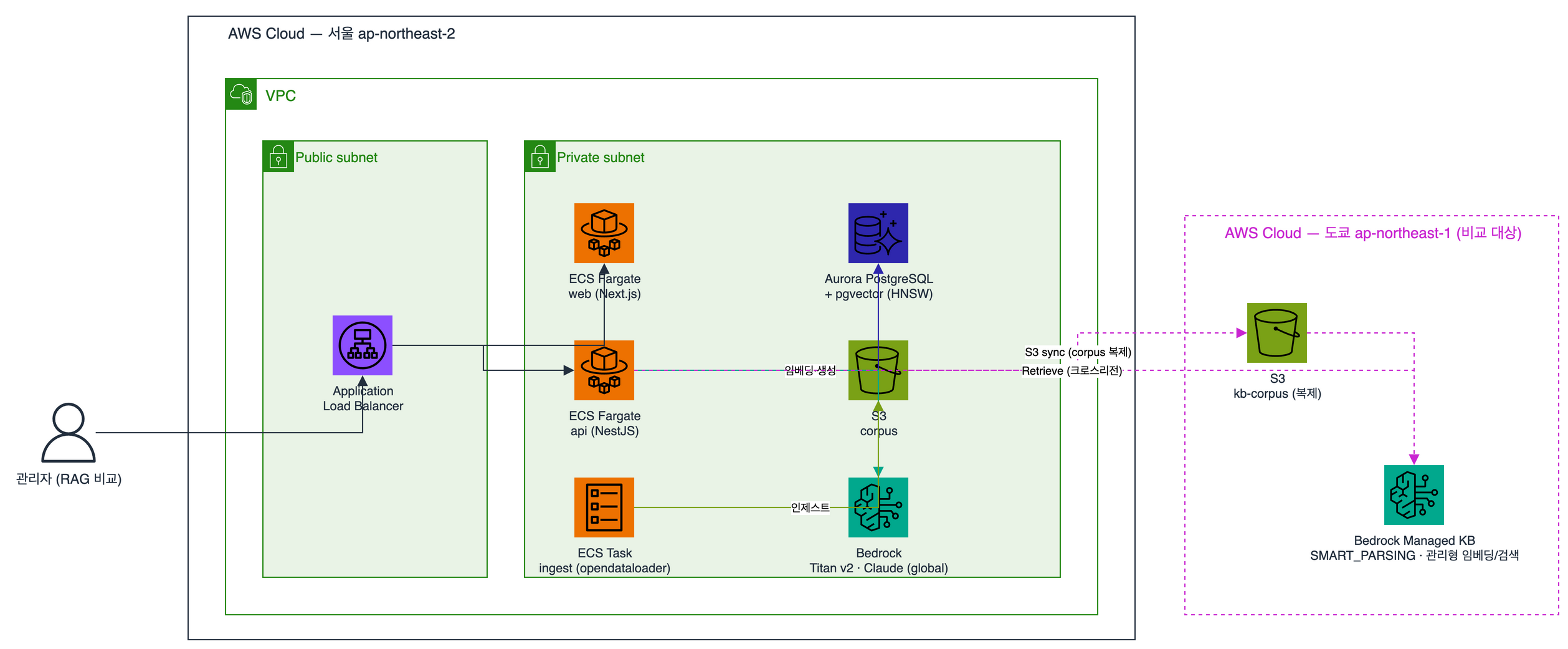
A PDF comes in and opendataloader parses it, preserving heading, paragraph, and table structure rather than extracting flat text. The key step comes next: Korean structure-aware chunking. Instead of mechanically cutting every N tokens, we cut along the document's section and heading boundaries, so an "exclusion criteria" table stays in one piece with its header.
We embed the chunks with Titan Text Embeddings v2 and store them in Aurora PostgreSQL's pgvector. HNSW index, cosine distance. On a query we pull the top-k chunks, build a context block, and hand it to Claude with a system prompt: "use only what's in the excerpts, and cite the source as [n] at the end of each sentence."
The cut strategy, the k value, which documents are on or off — all of it lives in our code. We can touch anything.
Fully-managed
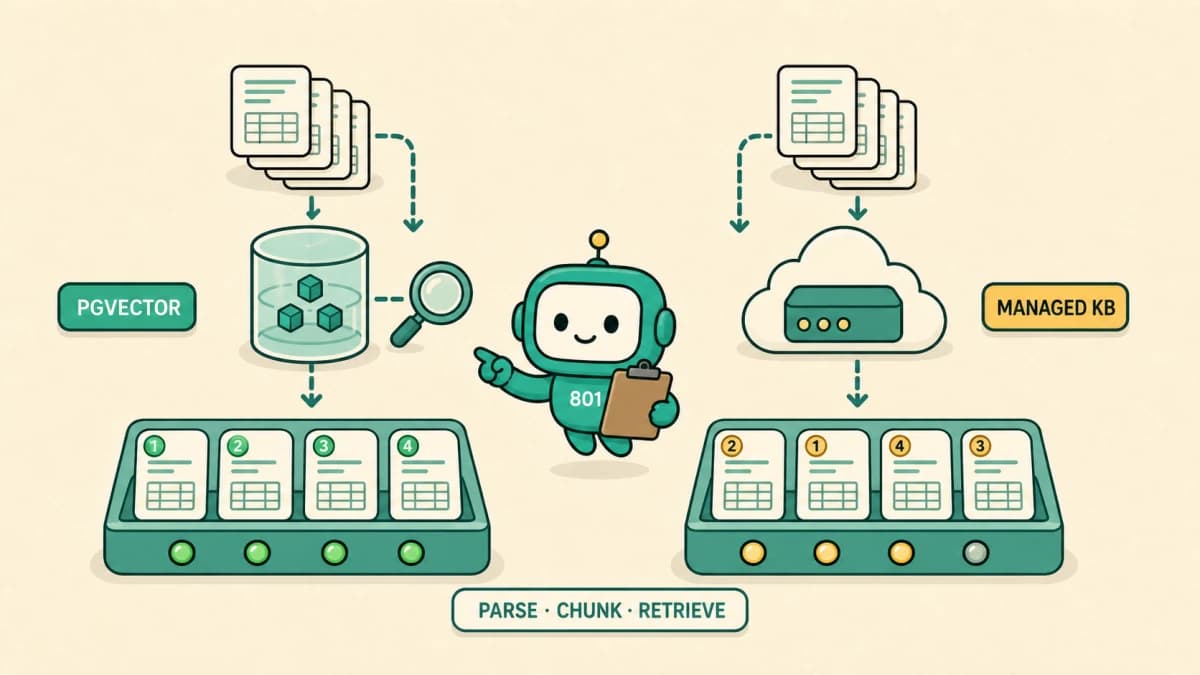
The other side hands most infrastructure operations to AWS. It bundles parsing, chunking, embedding, and retrieval into one service. Managed KB supports a 300-token, 20%-overlap default, custom fixed-size chunks, and NONE for pre-split documents.2 You can tune result count, metadata filters, and reranking.3 It does not let the application inject an arbitrary domain-boundary function or replace the managed store's scoring formula. That boundary comes with Bedrock provisioning and scaling the vector storage.
Standing it up was the first snag. Managed KB was not available in Seoul, so we placed the comparison environment in Tokyo.4 We replicated the corpus to S3 there and built the KB. The default embedding model is service-managed, so we did not need to select a separate model or request access to one. So far, easy.
To compare fairly, we pinned the generation step to the same Claude and the same prompt on both sides. We built one comparison endpoint and fired a single question down three paths at once: (1) our pipeline, (2) managed retrieval only, fed to the same Claude, (3) managed end-to-end RAG. We logged each path's answer, sources, and latency in one table.
The experiment
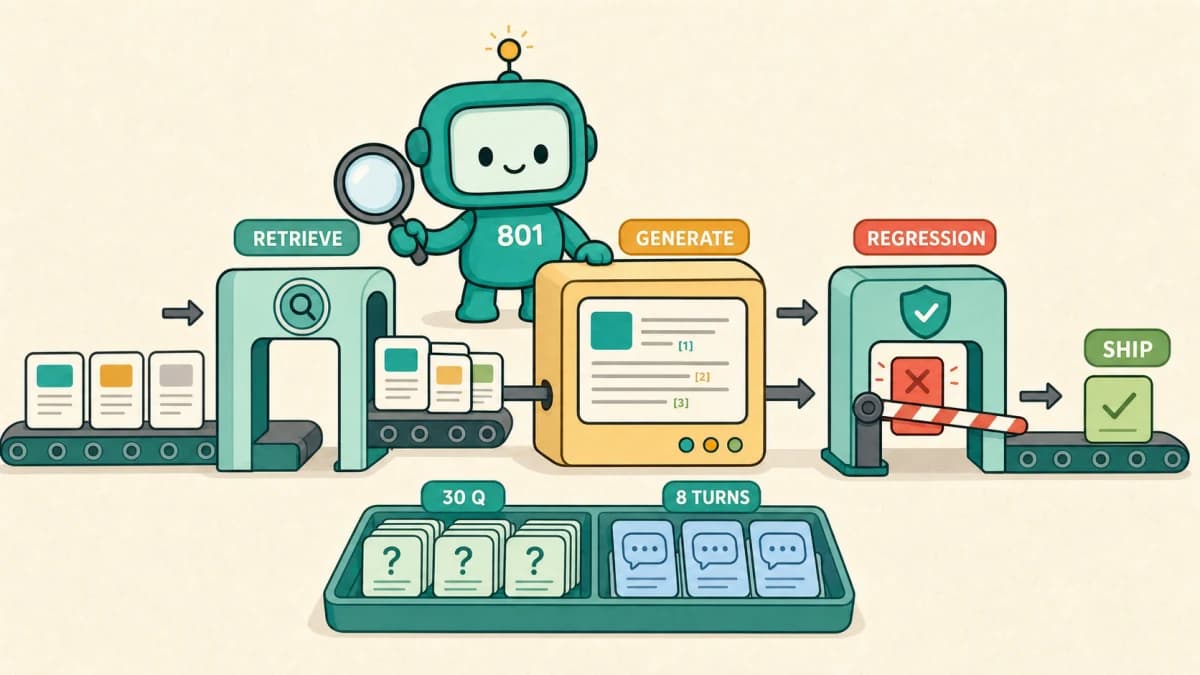
We threw 30 representative questions as single queries — fever protocols, per-disease exclusion periods, alert-level actions, reporting chains. The questions that actually come in from the field.
The school-health RAG benchmark publishes each system's response, evidence, and latency alongside the source workbook.
Then we added 8 follow-up sets to check context memory. Ask "exclusion for influenza?", and the moment it answers, follow with "and chickenpox?" To answer correctly, the model must restore the omitted "exclusion period" after "chickenpox" from the prior turn.
We explain how we split that set into retrieval, generation, and conversation checks and rerun it after each change in our RAG quality regression guide.
Results
Context memory was a tie. On all 8 sets, both sides correctly filled in references like "and chickenpox?" or "and who do I report that to?" from the prior turn. Pass the conversation history properly and the model handles it.
Tables decided the match. Our pipeline pointed straight at the cell values — oral exam "Mar–Nov," chickenpox "until crusting, at least 5 days after rash," page numbers and all. The managed side often dropped the same table, saying it "couldn't read the text." Latency averaged 5.4s against 4.8s in the managed side's favor, but being faster doesn't help if you can't read it.
Path (3), end-to-end RAG, failed all 30. At first we wrote that off as "managed doesn't support a combined retrieve-and-generate mode." Wrong call. The API reference later showed that the RetrieveAndGenerate operation we called does not support managed KBs.5 That's not a managed limitation; it's us knocking on the wrong door.
The result was clear: on Korean table documents, the hand-built side wins. But pinning down why took a few wrong turns.
Where I was wrong
My first diagnosis: "Managed falls back to a simple default parser, so it can't read tables. It isn't running OCR."
Re-reading the docs, that was wrong. This managed KB had run the smartest parser from the start. That's the default, and there's no other option.6 Suspecting the parser was a dead end.
To confirm, we re-ingested the same docs with the smart parser explicitly named. 6 of 30 came back from "not found" to correct. Measles exclusion went from "can't find" to "7 days." But the chickenpox row in the very same table, right next to it, still didn't surface.
Our second hypothesis was the default chunking.
Our comparison used the default ingestion setting, about 300 tokens with 20% overlap. The first results made it reasonable to suspect that this length had cut through a disease table. The measles row looked whole while the chickenpox row appeared to straddle a boundary.
Managed KB does not have only one chunking choice. It supports custom fixed-size chunks, and the API can use NONE with pre-split documents.2 What we lacked was the ability to inject our own Korean table-boundary rule as application code. Even that hypothesis needed another correction once we queried the index directly.
Wrong once more
"Default chunking is the culprit" was only half right too. Before closing this out, we stood the KB back up and poked the retrieval directly, and the result corrected me again.
The key row was sitting in the index just fine: "Until all blisters crust over, at least 5 days after rash." Nothing had been cut away.
The problem was recall. The natural-language query "what's the isolation criteria for chickenpox?" didn't surface that row near the top. We bumped results to 20 and turned on the managed reranker,3 but the ranking held. Reranking can't lift what recall missed; you can't reorder what isn't there.
So precisely: it's in the index, but the natural-language question does not retrieve it consistently. We could change result count and reranking, but the application could not directly replace candidate generation or the managed store's scoring formula. Chatbot users don't stuff keywords. They just ask, "how many days off for chickenpox?"
Where the money leaks
On the surface, managed looks cheaper. You do not stand up a vector DB, and the managed parser, embedding model, and reranker carry no separate line-item charge on top of index storage and retrieval.7 That does not make the service free. The trap is in the premise: "you don't stand up a vector DB."
We already run one. This service runs Aurora with or without RAG. pgvector just adds one column and one HNSW index on top. Because it rides on a DB that's already running, the new fixed cost RAG adds is near zero. The managed option bills index storage and retrieval separately, while its managed parser, embedding model, and reranker come included.7 And ours was in Tokyo, so cross-region transfer piles on too.
| What you pay for | pgvector (ours) | Managed KB |
|---|---|---|
| Vector store | Column + index on an already-running Aurora (marginal cost ≈ 0) | Usage-priced managed index storage |
| Ingest | One-off ECS task (minutes) + embedding | Managed parsing and embedding included |
| Retrieval | Existing DB query + one Titan query embedding | Retrieval calls billed; managed reranker included |
| Cross-region | None (single Seoul) | Tokyo cross-region transfer + corpus copy |
| Generation | Same Claude | Same Claude |
So the comparison turns on one question: are you already running a DB? We are, so spare capacity in Aurora kept pgvector's incremental cost low. From a bare floor with no DB, the math flips: operating a dedicated vector store becomes the real burden, and per-retrieval managed pricing can be cheaper at low traffic.
Managed KB versus pgvector FAQ
Which option costs less?
If an existing PostgreSQL cluster has spare capacity, pgvector can have a low marginal cost. If you would otherwise build a vector store and ingestion pipeline from scratch, usage-priced managed KB can win. Managed KB currently charges for indexed storage and retrieval calls, while built-in parsing, embedding, and reranking are included.7 Compare both designs with the same storage volume, monthly retrieval count, and cross-region transfer before choosing.
Which option gives more control?
pgvector does. The application owns the chunk schema, SQL, filters, hybrid scoring, candidate count, and reranking order. Managed KB also exposes result count, metadata filters, reranking, and several chunking strategies, but it does not replace the managed store's scoring formula or accept an arbitrary domain-boundary function from application code.3 Because a managed data source's chunking strategy cannot change after connection, run the evaluation set before the first production ingestion.2
What should I use for Korean tabular documents?
Choose by retrieval evaluation on the real tables, not by product category. First check whether the table title, column headers, and target row survive in one useful chunk. Then ask the questions users will actually type and measure whether the correct row reaches top-k. Compare the default 300-token path with custom fixed-size and pre-split documents where appropriate. Smart Parsing can process tables, but it does not guarantee retrieval will clear a business threshold. Our corpus needed more direct control of domain boundaries and scoring, so pgvector won. Another corpus can produce a different result.
A third option, OpenSearch
There's one candidate we deliberately left out: OpenSearch. A middle ground that keeps the KB's parsing and chunking but lets you control retrieval directly. The appeal is clear — it targets exactly the recall problem we hit. It blends BM25 keyword scores with kNN vector scores, and the Korean morphological analyzer nori sharpens keyword matching for words like "chickenpox" or "exclusion."
The cost claim now needs a generation qualifier. OpenSearch Serverless Classic collections have a minimum OCU floor for the first collection, so compute cost continues while idle. NextGen collections, by contrast, can scale indexing and search OCUs to zero after 10 minutes of inactivity when no minimum is configured.8 "Serverless always keeps a minimum unit running" is now true only of Classic. NextGen removes the always-on compute floor, but storage, cold starts, Region availability, and feature fit still need evaluation. For a two-document project, we did not need the added operational surface. When the corpus grows and natural-language recall accuracy becomes business-critical, we can compare OpenSearch hybrid again.
The decision
We kept the pipeline in production.
Managed was smart and exposed several chunking and retrieval settings. It did not extend to the arbitrary Korean table-boundary rules and storage-level scoring control we needed. Recall of key rows from natural-language questions stayed unstable, and the supported application-level tuning did not clear our threshold. We also had to use Tokyo instead of Seoul, with separate index-storage charges and usage-priced retrieval. Moving from a feature demo to those operating criteria follows the same gates we use to take an AI PoC into production.
What's left
RAG quality is parsing × chunking × retrieval. A product, not a sum: if one term nears zero, the rest can't save it. Here too, the moment we fixed parsing, chunking popped up as the next zero; and when we thought it was chunking, recall tripped us again.
"It's fully managed, so it must be optimal" missed. Managed is a way to reduce operations within supported controls, not a way to supply every domain-specific chunker and scoring formula. The defaults might have sufficed for English prose. Korean government tables required a real-query evaluation of that boundary.
We left the wrong diagnoses in, undeleted. Reversing the "parser problem" call twice is, we think, the most useful record this comparison produced.
Designing and validating RAG for Korean, regulated domains like this is part of what we do in AX Consulting and Data & ML Engineering. The point is making "automate it with AI" survive production.
References
AWS behavior and constraints above were verified against the official docs below. Comparison numbers (30 single-turn, 8 follow-up sets, measured retrieve) are from our own corpus.
Sources & notes8ExpandCollapse
Footnotes
-
Amazon Bedrock — Build a managed knowledge base. Defines the storage, indexing, and retrieval infrastructure handled by the managed service. ↩
-
Amazon Bedrock — Customize ingestion for a data source. Covers the 300-token, 20%-overlap default, custom fixed-size chunks, API
NONE, and the restriction on changing strategy after connection. ↩ ↩2 ↩3 -
Amazon Bedrock — Configure and customize queries for managed knowledge bases. Managed retrieval controls including result count, metadata filters, and reranking. ↩ ↩2 ↩3
-
Amazon Bedrock — Supported AWS Regions. As checked on 2026-07-16, Tokyo is listed and Seoul is not. ↩
-
Amazon Bedrock API — RetrieveAndGenerate. States that managed KBs are unsupported and directs them to
AgenticRetrieveStreamorRetrieve. ↩ -
Amazon Bedrock — Customize ingestion for a data source. Managed KB supports Smart Parsing only and uses it by default. ↩
-
AWS — Amazon Bedrock Pricing. Managed KB index-storage and retrieval pricing, and the conditions under which the managed parser, embedding model, and reranker are included at no extra charge. ↩ ↩2 ↩3
-
AWS — OpenSearch Service pricing · Creating collections. Classic minimum OCUs, NextGen scale-to-zero after 10 idle minutes, and creation options for both collection generations. ↩